
Students · Coursework
The set reading, out loud, the night before
Text to speech for students falls over in the same place every time: the coursework is a PDF of a journal article, and the app reads it as a list of lines instead of a piece of writing. Sandbook repairs the line breaks before it speaks a word, keeps your place in every file on the reading list separately, and needs no signal and no account to do it. Free, on iPhone and iPad.
iOS 18.2 or later · iPhone 12 or later & iPad · No account
In short
What is the best free text-to-speech app for students on iPhone?
Sandbook reads course PDFs, EPUBs, scanned handouts and pasted text aloud on iPhone and iPad, repairing the line breaks that make a journal article read as a list of lines, and highlighting each word as it is spoken. It keeps a separate reading position in every file on the reading list. It is free, with no account and no character or minute limit, and needs iOS 18.2 on an iPhone 12 or later. It does not summarise or translate.
Last verified 28 September 2026
A paper is a list of lines until something fixes it
A PDF does not store paragraphs. It stores text positioned on a page, and the line breaks in it are facts about the column width, not about the sentences. Pull that text out naively and you get one line at a time — which is why so many readers work through a journal article with a small hesitation every nine words, and pronounce a word split across a line end as two separate words.
Sandbook rejoins the visual line breaks into continuous prose and stitches hyphenated words back together before anything is spoken. “Method-” at the end of one line plus “ology” at the start of the next becomes methodology. Over a forty-page paper that is the whole difference between something you can listen to for an hour and something you give up on in the first minute.
An EPUB already tells a reader where its paragraphs end, so set texts in that format work straightforwardly. It is the PDF — the format nearly all coursework actually arrives in — that needs the repair work, and it happens automatically with nothing to configure.
Eleven items on the list, eleven bookmarks
A term's reading is not one book, it is a pile of files opened in a rotation. Sandbook stores reading position per file, so the chapter you abandoned on Tuesday is still on the paragraph you abandoned it on when you come back on Sunday, whatever you read in between.
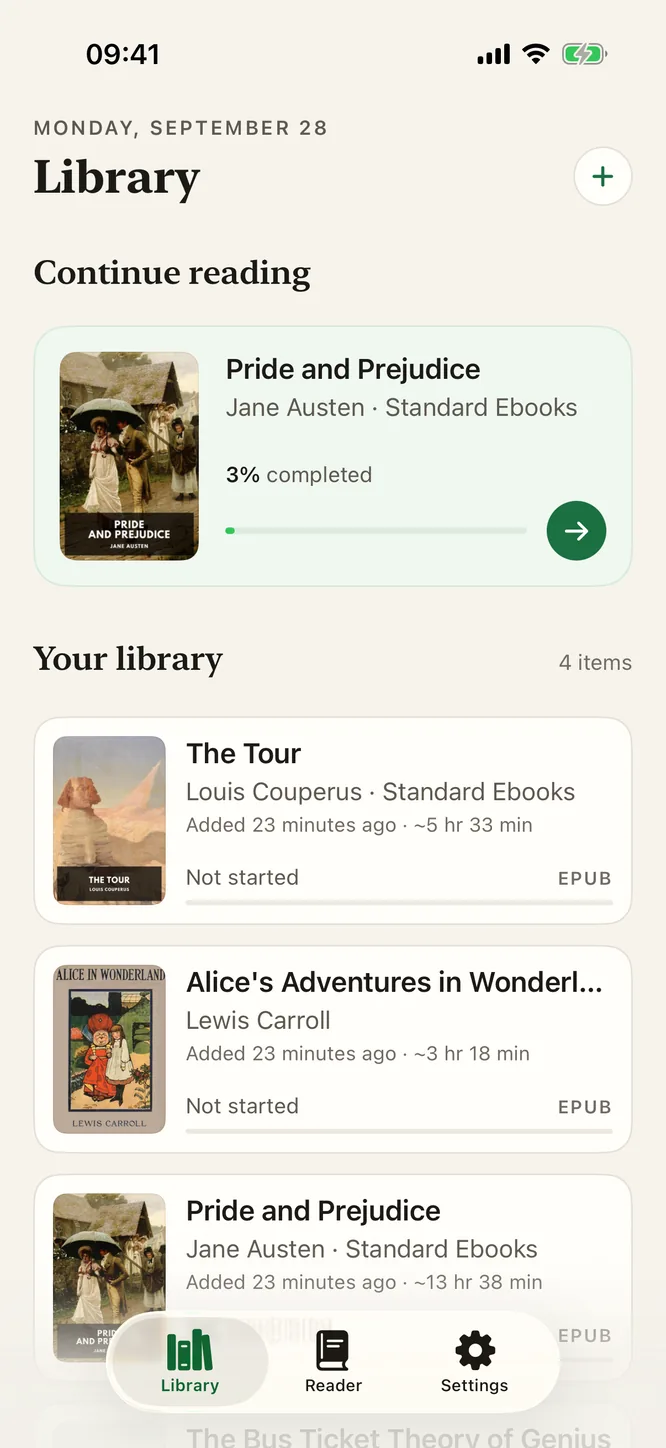
The shelf shows the whole pile at a glance: real cover art for EPUBs, a thumbnail of the first page for PDFs, a format badge and a progress bar for each one. Files are copied into the app's own storage when you import them, so a paper still opens after you have cleared out your Downloads folder or the seminar link has rotted.
Anything that is not a file works too. Paste a chunk of text, hand it your clipboard, or give it the URL of a web article and it will read that — useful for the reading that is a blog post or a newspaper piece rather than a document.
The first pass at 1×, the revision pass at 1.8×
Speed runs from 0.5× to 2.5× in tenth steps, and because it is applied inside the model — by scaling the predicted duration of each sound rather than resampling finished audio — the fast end stays a person talking quickly instead of a cartoon. That turns one control into two genuinely different jobs.
First time through, 1× while you follow the highlighted words on screen. Revising material you have already met, 1.6× or 1.8× to cover a chapter in the time it would take to re-read a third of it. And when a paragraph is doing real work — a proof, a definition, a dense bit of method — drop to 0.7× for that stretch and put it back afterwards. A steady voice matters more at 1.8× than an animated one, so listen to the voice samples before you settle on one.
Going back is a tap. Tap any paragraph and the voice restarts from there, so re-hearing a sentence does not mean dragging a progress bar and overshooting. The current paragraph stays tinted, the spoken word is marked, and the page scrolls to keep it in view, which is what makes it possible to follow an argument with your eyes while it is read to you.
No signal in the basement, no quota the night before
The voice is generated on your own device. Kokoro-82M is bundled inside the app and runs on the iPhone or iPad GPU through Apple MLX, so the library basement, the train and the aeroplane are ordinary conditions rather than failure cases. There is no file to pre-download and nothing marked unavailable offline — any file, any time, in airplane mode.
It also means there is no meter. No character cap, no monthly listening allowance, no credits to run out of at eleven at night before a nine o'clock seminar. That is not a promotion: the app has no in-app purchase at all, so there is no tier for anything to be rationed into. Nothing is uploaded either — no server sees your set reading, because there is no server.
Where it will not help you
Worth knowing before the week you actually need it, not after:
- Image-only PDF course packs are out. A PDF that is a photograph of paper has no text layer, and Sandbook does not run text recognition on PDF files. The paper itself can be scanned with the camera.
- No DOCX, PPTX or MOBI. Exporting a Word file or a slide deck to PDF first is the way around it.
- Real-time reading needs the screen on. It pauses when you leave the app or lock the screen. Prepare a chapter ahead of time to listen to it locked, but a whole reading list will not play hands-free on the walk between buildings.
- Six voice languages: US and UK English (28 voices), Spanish, French, Italian, Brazilian Portuguese and Hindi. Set reading in another language will not be spoken well.
- You cannot turn a set text into an audio file. Export is M4A, and only from the Reader tab for text you typed or pasted there, never a whole imported book or PDF.
- iPhone and iPad only, on iOS 18.2 with an iPhone 12 or later or an A14 iPad. There is no laptop version, so this does not replace reading at a desk.
What students ask before the first deadline
Will it read a scanned course pack or a photocopied reader?
The paper, yes; an image-only PDF of it, no. Scan Pages uses the camera to read up to 20 printed pages at a time, and From Photo reads a picture or screenshot of a handout, with the text recognized on your iPhone. A PDF file that is only a photograph of paper is not recognized, so try selecting a word in Preview or Files first: if you cannot select it, scan the paper instead.
Which file types can I import?
EPUB, PDF, TXT, RTF, Markdown and HTML, plus scanned pages and photos, web pages from the + menu or Safari, and text you type or paste. There is no DOCX, PPTX or MOBI support. If your reading is a Word document or a slide deck, exporting it to PDF first gives Sandbook a file it can read.
Is there a student plan, a discount or an institutional login?
There is no plan at all. Sandbook is free, has no in-app purchase and no subscription, and there is no account to create — so there is nothing to apply for, verify or expense. Every voice and every feature is there on the first launch.
Does it keep my place in each file separately?
Yes. Reading position is stored per file, so eleven items on a reading list keep eleven positions, and each one also remembers its own voice and speed. Close the app mid-chapter, open something else, come back a week later and the file opens at the paragraph where you stopped.
Can I listen with the phone in my pocket between classes?
Only a chapter you prepared first. Real-time reading pauses when you leave the app or the screen locks, because the voice model holds real GPU memory while it runs. Prepare a chapter for the lock screen before you leave, and that chapter plays with the screen locked, with 15-second skip. A whole reading list will not play on in the background.
Start with the paper you are already behind on
Import the PDF or scan the handout, press play, and follow each word while it reads. Line breaks repaired, position saved per file, 0.5× to 2.5×, and no connection needed. Free, with no in-app purchase and no account.
iOS 18.2 or later · iPhone 12 or later & iPad