
Ebook to audiobook · EPUB, PDF, Word
EPUB or PDF to audiobook, made on your own device
Sandbook is a free app that turns an EPUB, a PDF or a Word document into an audiobook on iPhone, iPad and Mac: one M4A audio file, read in one of 41 natural voices, with a chapter marker for each chapter. The audio is made on the device, so the book is never uploaded, and there is no account, no subscription and no character limit.
iOS 18.2 or later · iPhone XS / XR or later · iPad with A12 or later · Mac with M1 or later, macOS 15.2 · No account
In short
How do I turn an EPUB or PDF into an audiobook for free?
Open the book in Sandbook, tap … in the reader, then Export audio, choose Whole book and tap Export; on a Mac, choose File > Export Book Audio. You get one M4A file with a chapter marker per chapter, the cover and the title, in the voice and at the speed you picked. It is free, works offline, and the book never leaves your device.
Last verified November 11, 2026
On iPhone and iPad, step by step
- Bring the book in. Tap Import a file on the Import page, or share the file to Sandbook from Files, Mail or a cloud drive.
- Pick the voice and speed. The file is made in the voice and at the speed the reader uses, with any pronunciations you set, so press play for a minute first.
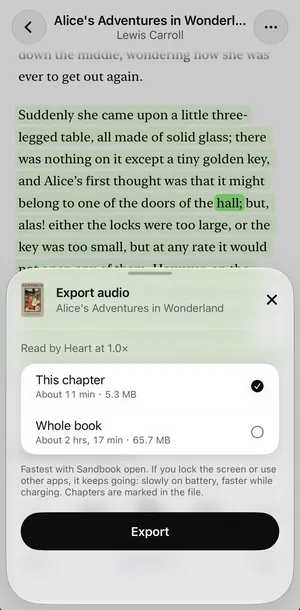
- Open the export sheet. Tap … at the top of the reader, then Export audio.
- Choose how much. This chapter or Whole book (in a PDF, This page or Whole document), each with its expected length and file size. Tap Export.
- Save it. When the sheet says Your audio is ready, tap Share or Save: Save to Files, AirDrop it, or send it to another app.
On iOS 26 and later the export keeps going if you lock the screen or switch apps: slowly on battery, faster while charging, fastest with Sandbook open. On earlier versions of iOS it pauses when you leave the app and goes on when you come back. Pressing play in the reader pauses the export, and Continue picks up where it stopped, without redoing the finished chapters. Write text has Export audio too, for text you type or paste.
On a Mac, step by step
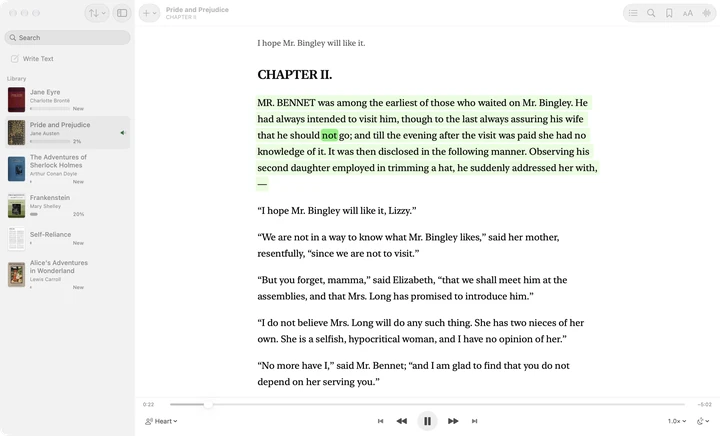
- Drag the file onto the Sandbook window, use File > Import, or open it from Finder with Open With.
- Open the book and choose its voice and speed.
- Choose File > Export Book Audio… (⌥⇧⌘E) for the whole book, or File > Export Chapter Audio… (⇧⌘E) for the open chapter or PDF page.
- When the progress sheet finishes, the save panel asks where the file goes in Finder.
Export Book Audio is offered for any book with more than one chapter, or a PDF with more than one page. If you quit midway, exporting the same book again in the same voice and speed continues where it stopped. More on the text-to-speech app for Mac.
What you get: one file, with chapters
A whole book becomes a single M4A file, not a folder of fragments. Inside it, each chapter has a marker titled like the chapter, so a player that shows chapters lets you jump straight to chapter nine. The file also carries the book's title, its author and its cover, so a player shows the book's name and picture instead of “track 1”.
The audio is AAC, mono, at 24 kHz and about 64 kbps: roughly 29 MB per hour of listening. Before an export starts, Sandbook checks the free space and says how much it needs if there is not enough. Chapter exports work the same way, for when you only want tonight's chapter on a walk.
What it can turn into an audiobook
- EPUB books without DRM, with their own chapters. See EPUB to speech for how they are read.
- PDF, scanned ones included: a page with no text is recognized on the device first. Broken lines are rejoined, as on PDF to speech.
- Word (.docx), whose headings become the chapters, and TXT, RTF, Markdown, HTML and saved web articles.
- Your own text from Write text.
Books bought in Kindle or Apple Books are locked with DRM, and Sandbook cannot open them; MOBI and AZW3 are not supported either. This is for books you own as plain files, your own documents, and the public domain. The easiest place to start is Browse classics on the Import page: 262 free public-domain books in six languages; download one and export it like any other book.
How it differs from online converters
Most of the converters that come up for “EPUB to audiobook” (checked November 2026) work the same way: you upload the book, often sign in, and the free plan stops at a number of characters, minutes or credits. Sandbook does the opposite on each point. The voice model runs on your device, so the book is never uploaded; there is no account; and nothing is metered, so a 600-page novel costs the same as a short story. It works in airplane mode.
To be fair to them: online converters work on Windows, Android and Chromebooks, where Sandbook does not exist, and many of them output MP3 and offer hundreds of voices in dozens of languages. If you are at home on a command line, open-source tools such as audiblez run the same Kokoro model on your own computer. On an iPhone, an iPad or an Apple-silicon Mac, Sandbook does the whole job on the device, free.
Limits, plainly
- M4A only. No MP3, WAV or M4B option.
- Apple devices only: iPhone XS, iPhone XR or later and iPads with an A12 chip or later on iOS 18.2, and Macs with Apple silicon on macOS 15.2. No Android or Windows app.
- Six voice languages: English, Spanish, French, Italian, Brazilian Portuguese and Hindi, 41 voices in all.
- A long book takes a while. The audio is made sentence by sentence on your device, so leave Sandbook open, or plugged in, for a long book.
- One export at a time, and no DRM-protected books.
Questions about making an audiobook
Can I convert an EPUB to an audiobook for free?
Yes. Sandbook is free on iPhone, iPad and Mac, with no subscription, no in-app purchase and no account. Open the EPUB, choose Export audio in the reader's … menu (on a Mac, File > Export Book Audio), and the whole book becomes one M4A file with a chapter marker for each chapter. There is no character limit and nothing is uploaded.
Can I turn a PDF into an audiobook?
Yes. In a PDF the choices are This page or Whole document, and the whole document becomes one M4A file with a marker for each page. Line breaks and hyphenated words are rejoined first, so it is read as prose. Scanned PDFs work too: pages with no text are recognized on the device before they are read.
Is the audiobook an MP3?
No. It is an M4A file (AAC audio), which plays in practically every current audio player, on Windows and Android too. Sandbook has no MP3 option; if a device insists on MP3, convert the M4A on a computer.
Does it keep the chapters?
Yes. A whole-book export carries one chapter marker per chapter, named after the chapter, plus the book's title, author and cover, all inside the one file. A Word document's chapters come from its headings, and a PDF gets a marker for each page.
Can I do it on a Mac?
Yes, on a Mac with Apple silicon and macOS 15.2 or later. File > Export Book Audio… (Option-Shift-Command-E) makes one M4A of the whole book with chapter markers, and File > Export Chapter Audio… (Shift-Command-E) saves the open chapter or PDF page. A save panel asks where to put the file.
Can I convert Kindle or Apple Books books?
Not if they are protected. Books bought in Kindle or Apple Books carry DRM, and Sandbook cannot open them; it also does not read MOBI or AZW3. It is for DRM-free files you own, documents you wrote, and public-domain books, such as the classics you can download inside the app.
Is my book uploaded anywhere?
No. The voice model runs on your iPhone, iPad or Mac, so the book is read and the audio is made on the device, in airplane mode too. The finished file goes only where you send it from the share sheet or the save panel.
How long does it take?
It depends on the length of the book and on the device. Before you start, the sheet shows how long the audio will be and how big the file; while it works, it shows the time left. It is fastest with Sandbook open. If the export is interrupted, Continue picks up where it stopped.
Make your first audiobook tonight
Import an EPUB, a PDF or a Word file, or pick a classic, choose a voice, and export the whole book as one M4A with its chapters. Free, offline, and the book never leaves your device.
iOS 18.2 or later · iPhone XS / XR or later · iPad with A12 or later · Mac with M1 or later, macOS 15.2