
Scan to speech · new in 1.0.4
Scan a page, hear it read aloud
Sandbook turns printed pages into speech on your iPhone: point the camera at a page, or pick a photo, and the text is recognized on your device and read aloud in a natural voice. Up to 20 pages at a time, one chapter per page, nothing uploaded. Free, with no account.
iOS 18.2 or later · iPhone 12 or later & iPad · No account
In short
Is there an iPhone app that scans a printed page and reads it aloud?
Sandbook scans printed pages with the iPhone camera, up to 20 at a time, or reads a photo or screenshot you pick, recognizes the text on the device and reads it aloud in one of 41 natural voices. Each page becomes a chapter you can listen to, offline. It is free, with no account and no subscription, and needs iOS 18.2 on an iPhone 12 or later. Image-only PDF files are not recognized.
Last verified 28 September 2026
How Scan Pages works
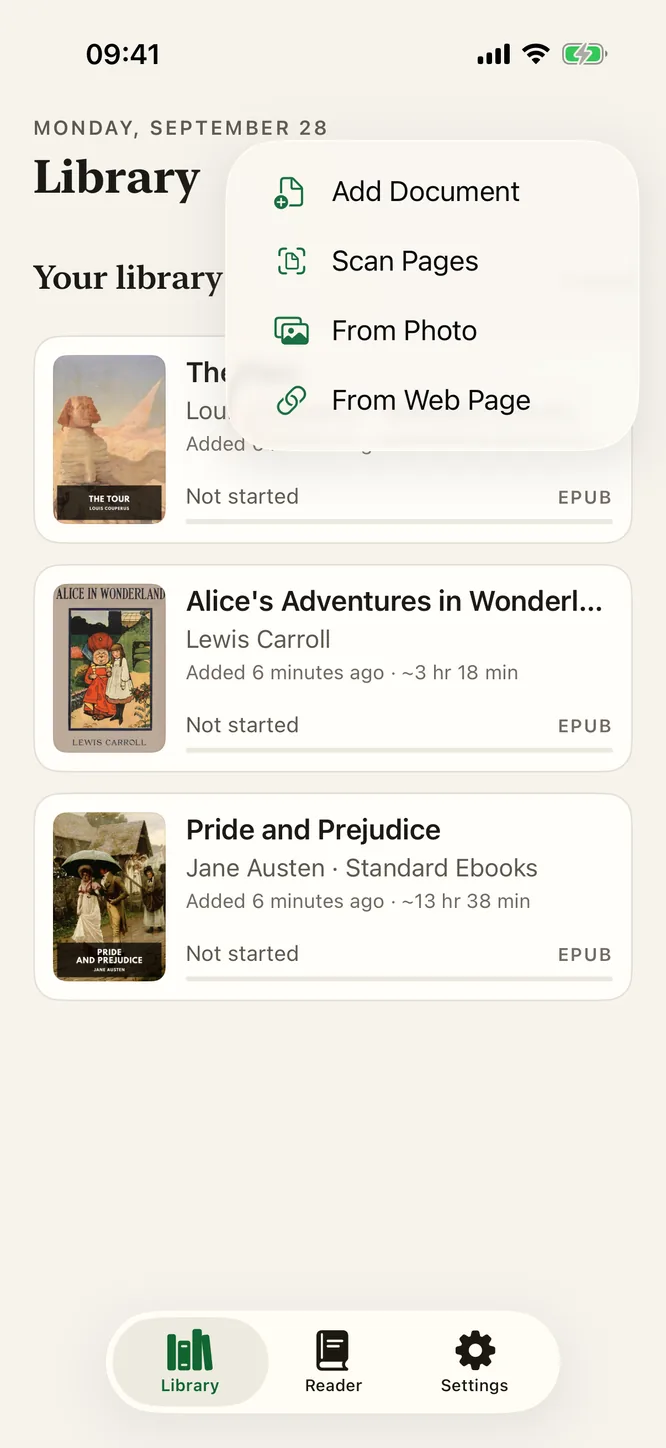
- Tap + in the library and choose Scan Pages. The iOS document camera opens. Hold the phone over the page; it finds the edges, straightens the page and takes the shot, or you can press the shutter yourself.
- Keep going, up to 20 pages. Turn the page and scan the next one. A chapter of a paperback, a stapled handout, a letter, the three pages of a contract: one session.
- Save. Sandbook recognizes the text of every page on your iPhone and adds the scan to your library as a book, with one chapter per page.
- Press play. The first sentence starts almost immediately, each word is marked as it is spoken, and you can tap any paragraph to read from there.
If the library is busy with another import when you finish, the scan is held until it is free, so nothing you photographed is lost.
From Photo: pictures and screenshots
Not everything arrives on paper you can hold. A photo of a noticeboard, a screenshot of an article someone sent you, a picture of a page you took last week: choose From Photo in the same + menu and pick one or more images.
Photos come through the system picker, which hands Sandbook only the pictures you select. There is no photo-library permission to grant, and the app never sees the rest of your camera roll.
Recognized on your iPhone, not on a server
Most scan-and-listen apps send the picture somewhere to be read. Sandbook does not. The text is recognized with Apple's own on-device text recognition, and the voice is generated by Kokoro-82M running on the iPhone's GPU. Neither step needs a connection, so scanning works in airplane mode, in a library basement or on a train.
The camera is used only while the scanner is open. The images are not uploaded anywhere, and the recognized text is kept in your library on the device, the same as any book you import. More on that on the private text-to-speech page.
Which languages read well
Sandbook has 41 voices in six languages: 28 in US and UK English, plus Spanish, French, Italian, Brazilian Portuguese and Hindi. Scan a page in one of those languages, give the book a voice in the same language, and it is read with that language's pronunciation. The book remembers its voice and speed.
Which languages the recognizer reads is decided by Apple's text recognition on your version of iOS, not by Sandbook, so whether a given language (Hindi in Devanagari, for example) is recognized depends on the iOS version you run. Clean, well-lit print gives the best result; glossy paper under a lamp, very small type and curved pages near a thick book's spine are the usual trouble spots. Rescanning one page takes a few seconds.
What it does not do
- Image-only PDF files. Sandbook does not run text recognition on PDF files yet. A PDF with a real text layer reads perfectly; a PDF that is only pictures of pages reads as empty. Scan the paper, or export the pages as images and use From Photo.
- Handwriting is not promised. Printed text is what the recognizer is for.
- Complex layouts. Multi-column pages, tables and captions are read in the order the recognizer finds them, which is usually right and occasionally not. A numbered list stays numbered.
- Real-time reading pauses when the screen locks. To listen to a scanned chapter with the screen off, prepare its audio first.
What people scan
A chapter of a paper book you want to finish on the walk home. A course handout that only exists as a photocopy. A letter from a bank or a school, read aloud before you decide what it means. A menu, a museum label, a recipe card. For students, a photocopied reader becomes something to listen to at 1.5×; for anyone who finds dense print hard going, each word is highlighted as it is spoken, in the theme and font you choose.
Questions about scanning
How many pages can I scan at once?
Up to 20 in one Scan Pages session. Each page becomes its own chapter, so you can skip between pages the way you skip between chapters of a book, and the whole scan is saved to your library under one title.
Is the scan uploaded to a server?
No. The camera image and the text recognition both stay on your iPhone: Sandbook uses Apple's on-device text recognition, and the speech is generated on the device by the Kokoro model. It works in airplane mode.
Can it read a photo or a screenshot I already have?
Yes. Choose From Photo in the library's + menu and pick a picture or a screenshot. The system photo picker hands Sandbook only the images you choose, so it never gets access to the rest of your photo library.
Can it read a scanned PDF file?
Not yet. Sandbook recognizes camera scans and photos, but it does not run text recognition on PDF files, so an image-only PDF has nothing to read. If you still have the paper, scan it with the camera; if you only have the file, export its pages as images and use From Photo.
Does it read handwriting?
Handwriting is not promised. Recognition is tuned for printed text: books, handouts, letters, menus and signs. Neat handwriting sometimes comes through, but do not rely on it.
Which languages can I scan?
Sandbook reads the recognized text in any of its six voice languages: US and UK English, Spanish, French, Italian, Brazilian Portuguese and Hindi. Pick a voice in the page's language. Which scripts the recognizer reads depends on your iOS version.
Point, scan, listen
Scan up to 20 printed pages or pick a photo, and Sandbook reads them aloud in a natural voice, recognized and spoken on your iPhone. Free, no account, no subscription.
iOS 18.2 or later · iPhone 12 or later & iPad