
EPUB reader with text to speech
An EPUB reader that reads your books aloud, offline
Sandbook is a free EPUB reader for iPhone and iPad that reads your books aloud in natural voices, highlights each word as it is spoken and remembers your place, fully offline. Import the file, tap play, and it reads the book like an audiobook in one of 41 voices in six languages, advancing into the next chapter by itself, with the voice model running on the device rather than a server.
iOS 18.2 or later · iPhone 12 or later & iPad · No account
In short
How can I listen to an EPUB book read aloud on my iPhone?
Sandbook imports an EPUB through the Files picker or the share sheet and reads it aloud in one of 41 voices, including 28 English voices and voices in Spanish, French, Italian, Brazilian Portuguese and Hindi, marking each word as it is spoken and opening each book where you stopped. It is free on iPhone and iPad, with no account, no subscription and no character cap, and needs iOS 18.2 on an iPhone 12 or later. It does not import MOBI or AZW3, and it does not export a whole book as an audio file.
Last verified 28 September 2026
EPUB to speech: how to read an EPUB aloud
- Get the file into the app. Either open Sandbook and use the Files picker, or find the
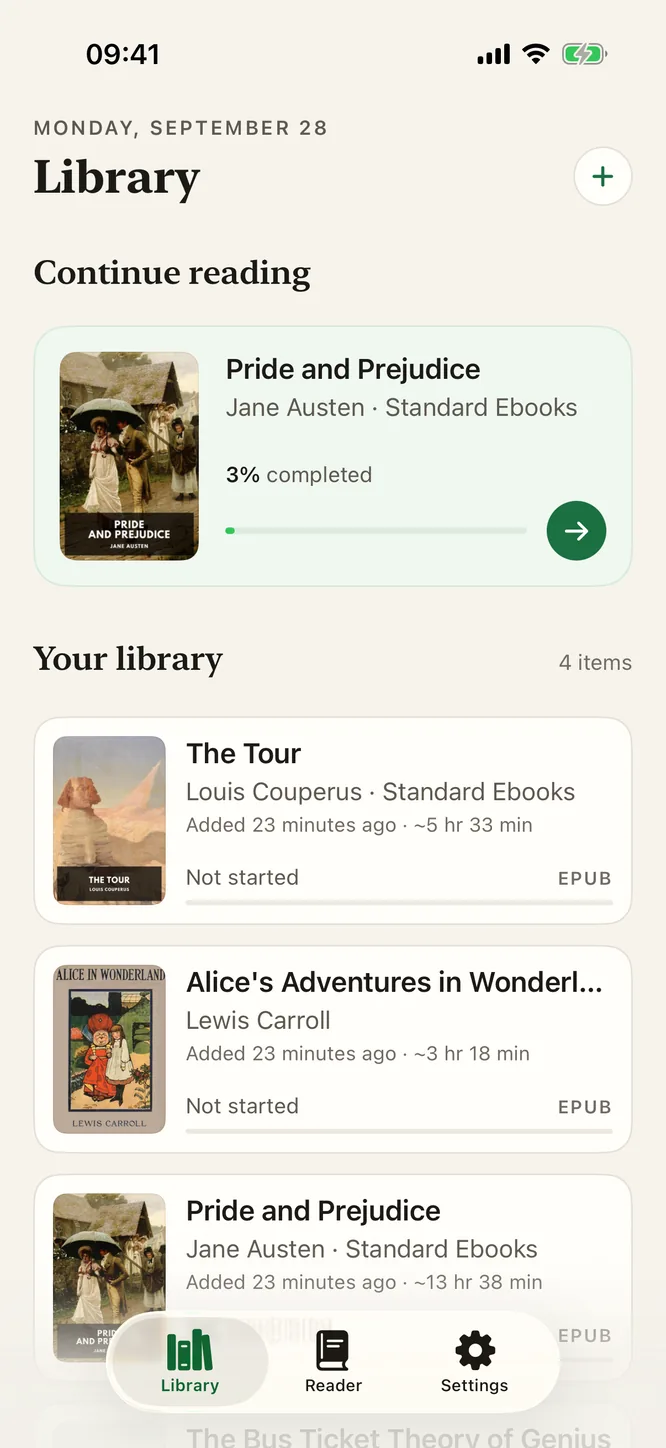
.epubin Files, Mail or Safari and choose Open with Sandbook or share it to Sandbook. The book is copied into the app's own storage, so it keeps working after you move or delete the original. Import a file with a name you already have and you get Book (2).epub rather than a silent overwrite. - Open it from the shelf. Your library shows the real cover art from the EPUB, the title and author, a format badge, the word count and how long the book takes to hear. The book opens at the paragraph where you stopped.
- Press play. The first sentence starts speaking within a moment; the rest generates ahead of playback while you listen.
- Steer while it reads. Tap any paragraph to jump there. Skip a paragraph back or forward, move a chapter at a time, or open the chapter list and go anywhere in the book.
That is the whole flow. EPUB to speech takes four taps — there is no conversion step, no upload, and no waiting for a file to render.
Reading along while it reads aloud
The paragraph currently being read gets a soft tint, the word being spoken is marked inside it, and the page scrolls to keep it in view, so you can follow the text with your eyes, glance away, and find your place again instantly. Scroll away on purpose and a “Back to current” button brings you back. It is the mode that makes a dense book survivable: listening carries you forward, the highlight keeps you anchored.
You can also just read normally and use the voice when your eyes get tired. Reading Options gives you light, sepia and dark themes (or follow the system), System, Serif, Rounded, Mono and Legible fonts, text size and line spacing on top of your system text size, and an immersive mode that hides the controls.
Chapters come from the EPUB spine. HTML is stripped down to clean paragraphs, chapter titles are pulled from the document's own headings, and empty chapters are skipped so you don't sit through three seconds of silence between sections.
It keeps your place, per book
Finish a chapter and Sandbook continues into the next one without being asked, so a book plays continuously rather than stopping every twenty minutes. Close the app mid-paragraph and your position is saved for that specific file — reopen it a week later, from the shelf, and you resume where you were. Every book in the library keeps its own place independently.
Because everything is stored on the device, this survives airplane mode and a dead cell signal. It does not survive moving to a different iPhone: there is no account and no sync, so your place lives on the device that read it.
What works, and what doesn't
Works: any DRM-free .epub file — books from Standard Ebooks, Project Gutenberg, Humble Bundle, itch.io, most indie publishers, anything you exported yourself, plus PDFs and plain .txt, RTF, Markdown and HTML files, and web pages.
Doesn't work: DRM-protected books from a store's own reader, and MOBI, AZW3 and DOCX files. If you have a format that isn't supported, convert it to EPUB first.
Voices come in six languages: 28 American and British English voices, plus Spanish, French, Italian, Brazilian Portuguese and Hindi. Pick a voice in the book's language and the book remembers it. The app needs iOS 18.2 on an iPhone 12 or later, or an iPad with an A14 or M1 chip or later.
And it is a reader, not an audiobook exporter. Sandbook reads an EPUB aloud while the book is open in front of you; it does not turn a whole book into an audiobook file you can keep or play elsewhere. M4A export exists, but only in the Reader tab for text you typed or pasted there. If what you want is a whole book rendered to audio, this is the wrong app and the FAQ below says so too.
Choosing a voice for a long book
A voice that sounds pleasant for thirty seconds can grate over nine hours, so audition before you commit. The voice picker synthesizes a sample line on the spot with the real model, so what you hear is what the book will sound like, and you can star the ones you want kept at the top. Each book remembers its own voice and speed. Before you install, you can paste a page of your book into the in-browser version of the same voices and listen.
Fiction tends to sit well with the warmer, more expressive voices; a technical book is easier to follow in something steady and even. Speed runs 0.5× to 2.5× and is applied inside the model by stretching or compressing predicted phoneme durations, so 1.8× sounds like someone reading briskly rather than a tape played fast.
EPUB questions
Can I export a whole book as an audiobook file?
No. M4A export exists, but only in the Reader tab, for text you typed or pasted there. There is no whole-book export, so an EPUB can be listened to but not saved out as an audiobook file. You can prepare a chapter's audio ahead of time to listen with the screen locked, but that stays inside the app.
Does it work with books from Kindle or Apple Books?
Only if the file is DRM-free. Sandbook reads .epub files you can open yourself; it cannot open a DRM-protected purchase from another store's library, and it doesn't read MOBI or AZW3 at all. Books from Standard Ebooks, Project Gutenberg, most indie publishers and your own exports all work.
Do I need a connection to listen to an EPUB?
No. EPUB to speech happens entirely on the device — the model is inside the app and runs on the GPU — so an imported book plays in airplane mode exactly as it does on Wi-Fi. There is no per-chapter download, no cloud rendering step, and no account to be signed in to.
Does it keep reading if I switch to another app?
Real-time reading pauses when Sandbook leaves the screen or the screen locks, because the speech model is holding real GPU memory while it works. To listen with the screen locked, prepare the chapter's audio first from the reader's menu; that chapter then plays locked, with 15-second skip. A whole book will not play on continuously in the background, which is the app's biggest limitation compared with cloud-based readers.
How long does a chapter take to start?
Almost no time. Speech is generated sentence by sentence with a look-ahead buffer, so playback begins once the first sentence is ready and the rest is produced while you listen. You never wait for a whole chapter to be rendered before anything plays.
Import a book, press play
If you have an EPUB and twenty minutes of walking ahead of you, this is the shortest path from EPUB to speech: import, play, and the book reads itself aloud in a natural voice with nothing uploaded and nothing to pay. Read along with the highlight, or put the phone down and listen.
iOS 18.2 or later · iPhone 12 or later & iPad