
Reading support · Read-along
The paragraph you are hearing stays lit
People look for text to speech for dyslexia wanting one specific thing: to take some of the work off the eyes without losing the page. Sandbook is a reading app — not a clinical tool, not a certified accessibility product, and not a treatment for anything. What follows is a plain list of what it actually does, so you can decide for yourself whether it helps.
iOS 18.2 or later · iPhone 12 or later & iPad · No account
In short
What is a good text-to-speech app for dyslexia on iPhone?
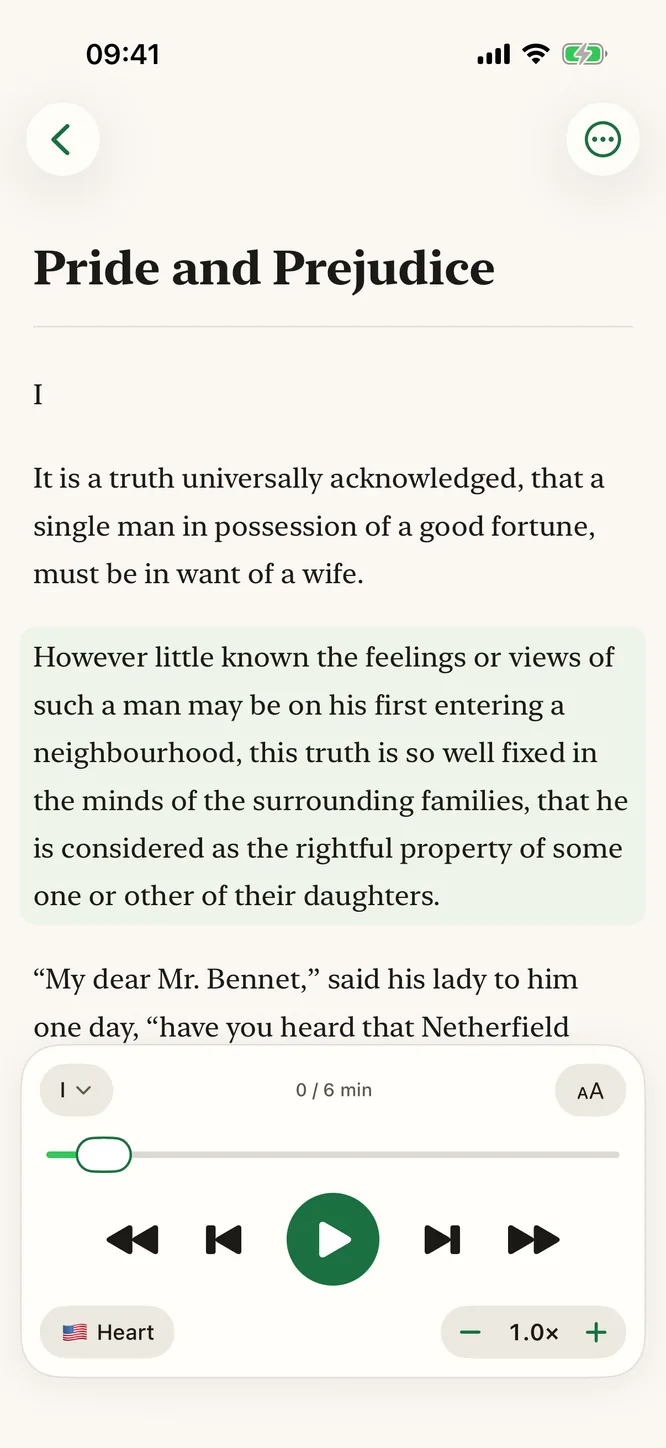
Sandbook is a free text-to-speech reader for dyslexia on iPhone and iPad: it reads EPUB, PDF, web pages, scanned pages and pasted text aloud while highlighting each word as it is spoken, inside a softly tinted current paragraph. Sepia, dark and light themes, a Legible font, text size and line spacing are adjustable, and speed runs 0.5× to 2.5× with pitch preserved. It is free, with no account and no usage cap, and needs iOS 18.2 on an iPhone 12 or later. It is a reading app, not a clinical or certified accessibility product.
Last verified 28 September 2026
Hearing it and seeing it, at the same time
Sandbook's reading view does not replace the page with a player. The text stays on screen while the voice moves through it, and the paragraph currently being read carries a soft tint, with the word being spoken marked inside it. The view scrolls on its own to keep that paragraph visible, so the place you are at is never something you have to go looking for. If you scroll away on purpose, a “Back to current” button takes you back.
That matters most in the moment attention slips. Look up, answer someone, look back: the marked word is exactly where the voice is, and you rejoin the text instead of restarting it. It is also how you catch the app mishearing a name or a piece of notation — you can see the words it is on.
Going back is a tap, not a scrub. Tap any paragraph and the voice starts from there, so re-hearing a difficult sentence costs one gesture rather than dragging a progress bar around and overshooting twice. You can also skip a paragraph at a time, move by chapter, or open the chapter or page list and jump anywhere in the file.
Set the page before you set the voice
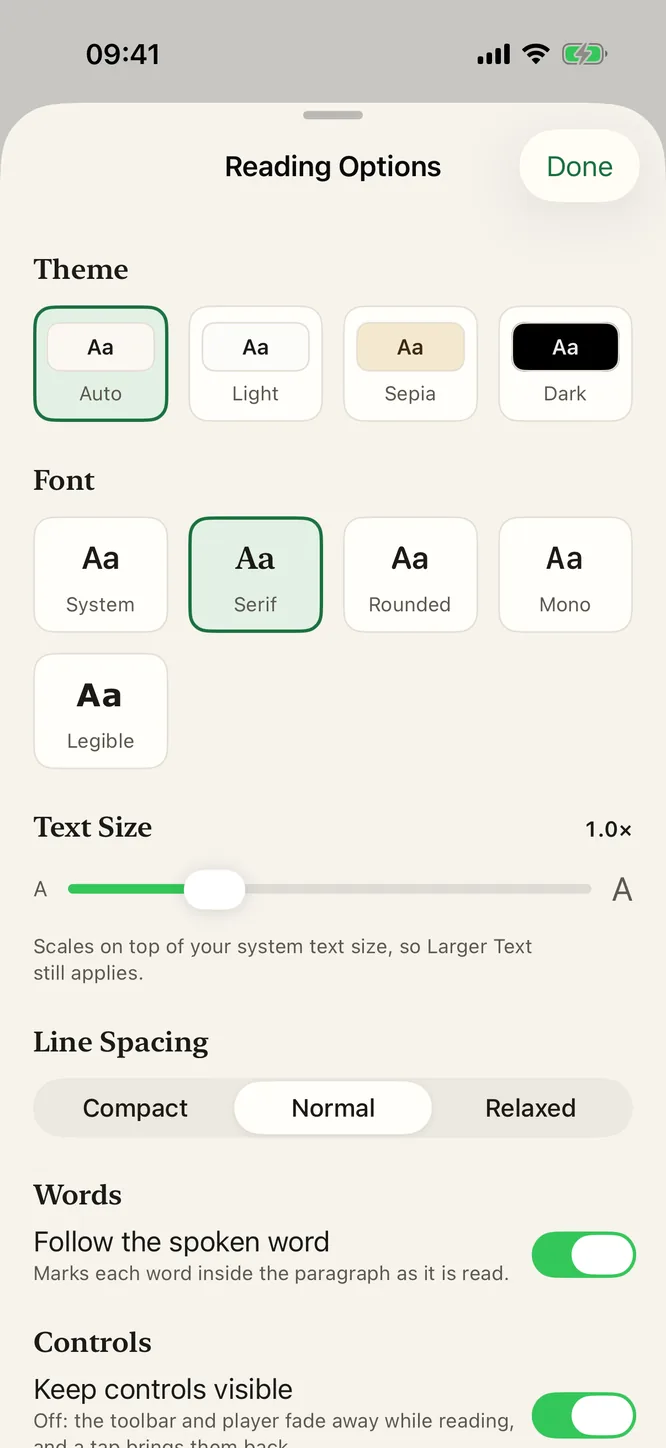
How the text is drawn is not a cosmetic preference for everyone, so the controls are in the reader's Reading Options rather than buried in Settings. There are four themes, Light, Sepia, Dark and Auto, so a page at night is not a white rectangle in a dark room. There are five fonts: System, Serif, Rounded, Mono and Legible, a Verdana-style face with open letter shapes. Text size runs from 0.8× to 1.6× on top of your system text size, with compact, normal or relaxed line spacing, and an immersive mode hides the controls.
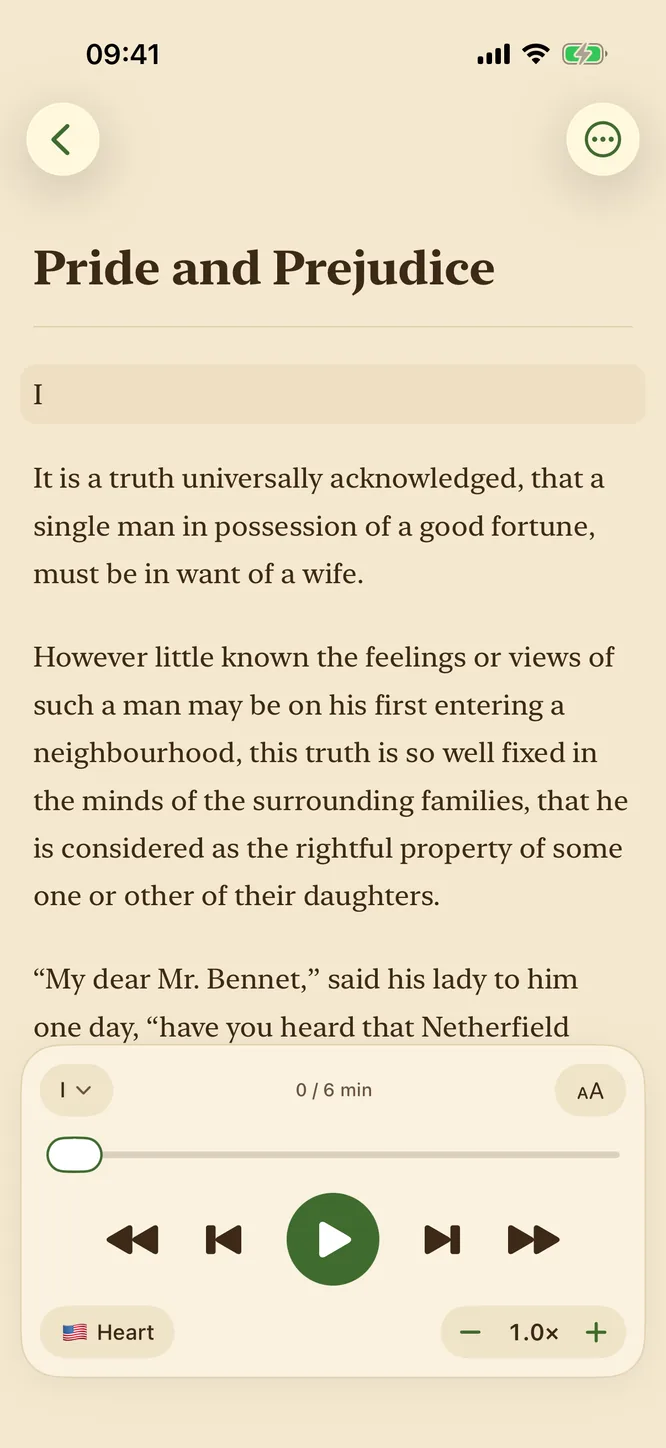
Sandbook takes no position on which combination is better for you, because that would be a claim we cannot support. They are simply all there, they can be changed in the middle of a chapter, and the reader keeps whatever you last chose. The same is true of the voice: 41 voices, including 28 English voices (20 American and 8 British), every one of them free, and any of them can be auditioned before you commit an hour to it. Each book remembers its own voice and speed.
Half speed is a setting, not a compromise
Speed runs from 0.5× to 2.5× in tenth steps, and the way it is implemented is the reason it is usable at the slow end. Rather than stretching a finished waveform, Sandbook scales the durations the model predicts for each sound, so 0.6× is a person speaking deliberately rather than a recording being dragged out. Nothing warbles, and nothing turns into a chipmunk at 2× either.
In practice that gives you two different tools from one slider: slow for a paragraph that is doing real work, and fast for the third pass through material you already know. Both are one tap from the reading view, and the setting survives closing the app.
It remembers the page so you don't have to
Every file keeps its own reading position. Put a book down at chapter nine, open a PDF, come back a week later, and the book opens at the paragraph where you stopped, with no bookmarks to set, no syncing and no cloud library to log into. Your library shows how far through each file you are, and how long it takes to hear.
There is no account anywhere in the app, which also means there is no setup ritual between deciding to try this and hearing a page. You install it, open an EPUB or a PDF, and press play. It is free with no in-app purchase, so nothing has to be cancelled if it turns out not to suit you.
What this page is not saying
An app that lists features next to the word dyslexia should be explicit about where its claims stop, so here is the boundary in full.
- Sandbook makes no medical or clinical claim. It does not treat, diagnose, manage or improve any condition, and no study has been run on it.
- It holds no accessibility certification and is not audited against any accessibility standard.
- It is not a screen reader and not a replacement for VoiceOver, Speak Screen or any other iOS accessibility feature. It reads documents you open in it, and nothing else on your phone. The app itself has VoiceOver, Voice Control, Switch Control, larger text and contrast improvements.
- Scanned pages are recognized from the camera or photos, but an image-only PDF file is not, and handwriting is not promised.
- Voices cover six languages: US and UK English, Spanish, French, Italian, Brazilian Portuguese and Hindi.
- Real-time reading pauses when the screen locks, because the model holds real GPU memory while it works. A chapter prepared ahead of time can play with the screen locked.
- It needs an iPhone 12 or later on iOS 18.2, or an iPad with an A14 or M1 chip or later.
If any of what is on this page helps, it will help because of what the app does, not because of a label attached to it. That is the only claim being made here.
Straight answers before you install
Is Sandbook an assistive or accessibility product?
No. Sandbook is an ordinary reading app that speaks text aloud. It is not certified against any accessibility standard, it is not a screen reader, and it does not replace VoiceOver or any of iOS's own accessibility features. Version 1.0.4 did bring VoiceOver, Voice Control, Switch Control, larger text and contrast improvements to the app itself. Nothing on this page is a medical or clinical claim.
Does it highlight word by word?
Yes. The paragraph being read gets a soft tint, and inside it each word is marked as it is spoken. The option is called Follow the spoken word and is on by default in Reading Options. The view scrolls to keep the current paragraph on screen. Word marking is not shown in the PDF page view or for a chapter prepared for the lock screen.
Can I slow the voice down?
Yes. Speed runs from 0.5× to 2.5× in tenth steps, and it is applied inside the model by scaling predicted phoneme durations rather than by stretching finished audio — so a slow setting sounds like someone speaking slowly, not like a tape being dragged.
Can I change the typeface and the text size?
Yes. Reading Options has five fonts (System, Serif, Rounded, Mono and Legible, a Verdana-style face), text size from 0.8x to 1.6x on top of your system text size, three line spacings, and Light, Sepia, Dark or Auto themes. You can change any of them mid-chapter and the reader keeps your setting.
Can it read a printed page, a worksheet or a photocopy?
Yes. Scan Pages uses the camera, up to 20 pages at once, and From Photo reads a picture or screenshot. The text is recognized on your iPhone and each page becomes a chapter you can listen to. Handwriting is not promised, and an image-only PDF file is not recognized.
Try it on a page you already have
Open an EPUB, a PDF, a scanned page or a pasted paragraph, set the type the way you want it, and follow each word as it is spoken. Free, no account, no in-app purchase, and it works with no connection.
iOS 18.2 or later · iPhone 12 or later & iPad